
This is an old revision of the document!
MIDI to CV
A Midi to Controll Voltage Board.

Hardware:
Schematic:
Midi In, Out or Thru:

Midi to CV:

Board:

ps201_-_midi_to_cv_11.ai.zip

Faceplate:

ps201_midi_to_cv_faceplate_02.ai.zip
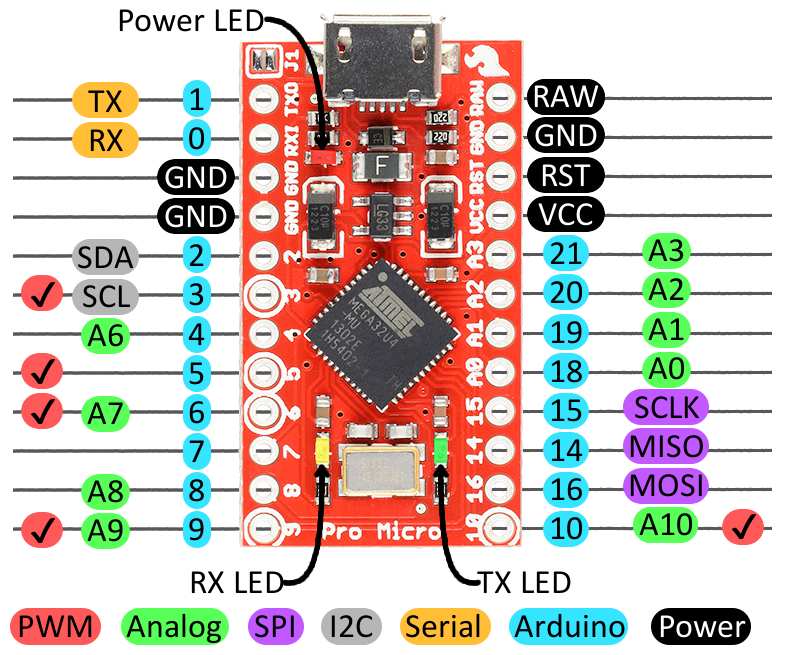
The Arduino Pro Micro clone:
https://www.sparkfun.com/products/12640
LM4040c41 Precision Voltage Reference:
Datasheet LM4040
Pinout:

Digital-to-Analog Converter MCP4922:
Datasheet MCP4922
MIDI In/Through:
midi_board
Filter:
http://sim.okawa-denshi.jp/en/Fkeisan.htm
http://www.ekswai.com/en_lowpass.htm
Software:
The Arduino Leonardo Arcore code is here on Github:
https://github.com/dernulleffekt/midi_to_cv.git
Fast PWM:
A super tutorial for the fast PWM on Arduino Leonardo:
http://r6500.blogspot.de/2014/12/fast-pwm-on-arduino-leonardo.html.
Due to the fact that the Pro Micro has no pin 11 or 13 I had to activate fast PWM on pin 5. It is the complementary channel A and thats why all values are 255 - value.
And here's the code:
void pwmSet5(int value)
{
 OCR4A = 255 - value; // Set the negativ PWM value
 DDRC |= 1 << 6; // Set Output Mode C6
 TCCR4A = 0x42; // Activate the complementary channel A
}
USB-Midi hack for the Leonardo:
thanks to Ralf Kistner for the code:
https://github.com/rkistner/arcore
Modifikation on Arch Linux:
install: libtinfo
copy: avrdude, arduino64, arduino.conf
to .../Arduino/hardware/tools
MIDI Library:
MIDI Library 4.2
MIDI Library Callbacks Description
MIDI Specifications:
http://www.midi.org/techspecs/midimessages.php
http://dernulleffekt.de/midi/table1.html
http://dernulleffekt.de/midi/table2.html
http://dernulleffekt.de/midi/table3.html
http://dernulleffekt.de/midi/table4.html